The Login Page Is Real. That's the Problem
For years, users have been trained to look for fake login pages.
- Check the URL
- Look for spelling mistakes
- Verify the domain
- Make sure you're on Microsoft before entering your password
For defenders and blue teams, URL reputation has long been an effective way to stop phishing attacks. Security tools routinely block newly registered domains, suspicious domains with little reputation history, and known phishing sites identified through threat intelligence feeds. This approach works well when attackers host their phishing pages on their own infrastructure.
However, what happens when the phishing link points to a trusted domain such as Microsoft?
The Shift From Password Theft to Session Theft
Historically, phishing attacks focused on stealing usernames and passwords. In response, organizations widely adopted multi-factor authentication (MFA) to prevent attackers from taking over accounts using stolen credentials alone.
To bypass these protections, cybercriminals evolved their tactics. Modern adversary-in-the-middle (AiTM) phishing kits, such as Evilginx, act as a proxy between the victim and the legitimate service, allowing attackers to capture authenticated session cookies after the user successfully completes MFA.
Phishing-as-a-Service (PhaaS) platforms such as TeamTycoon have further lowered the barrier to entry by providing ready-made phishing kits capable of harvesting session cookies and enabling account takeover without requiring the victim's password or MFA code. Figure 1 shows the attack flow of AiTM.
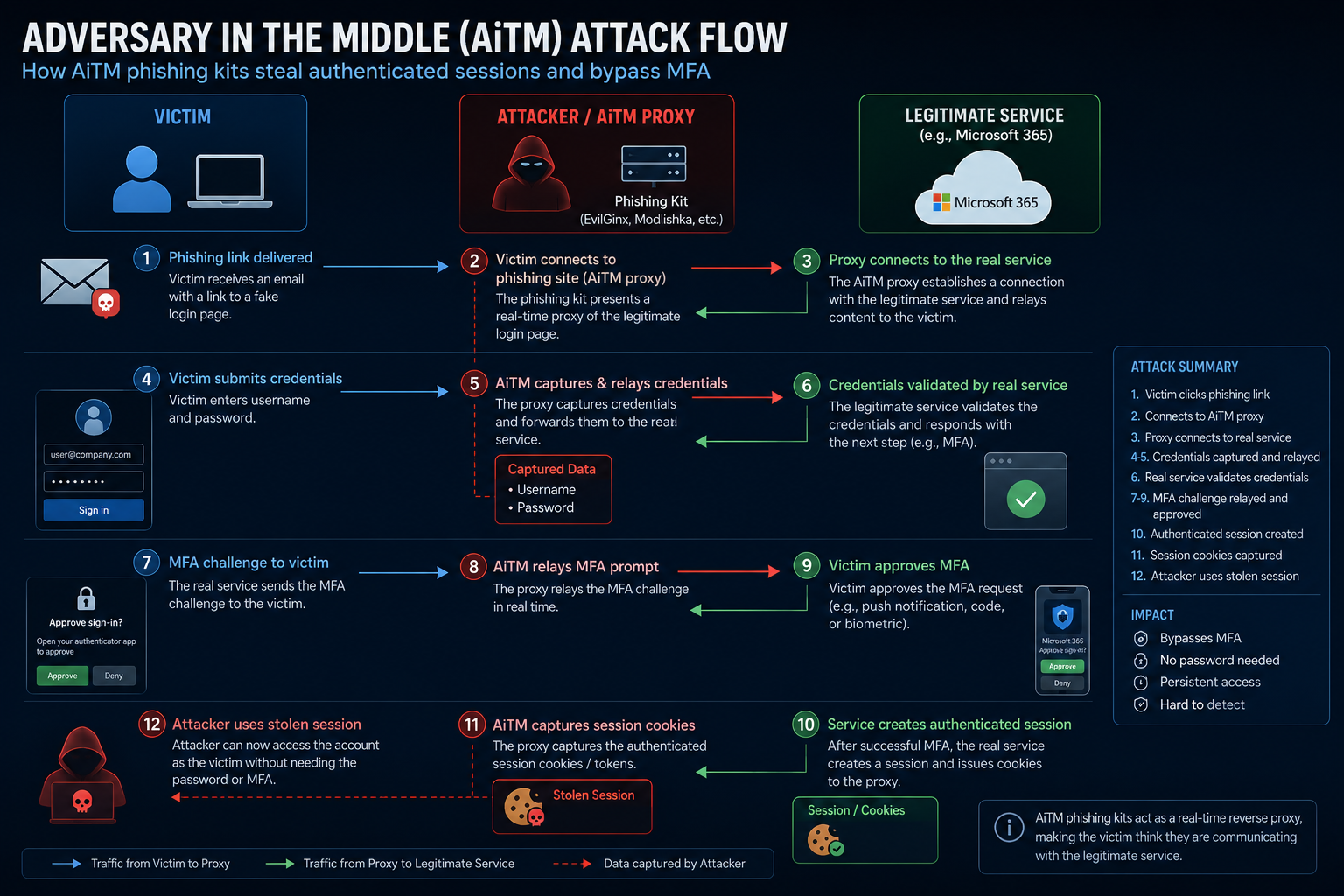
Figure 1: Adversary-in-the-middle Attack Flow
As defenders strengthened their protections against AiTM attacks, cybercriminals evolved their tactics once again, targeting something even more valuable than passwords and session cookies:
- Access tokens
- Refresh tokens
- Authenticated sessions
A valid authenticated session can provide immediate access to:
- Outlook
- OneDrive
- SharePoint
- Teams
- Internal business applications
In many cases, the attacker never needs the user's password. They simply need access to the authenticated session. This evolution is why many organizations continue to experience account compromise despite deploying MFA.
Evade Detection With Microsoft Authentication Flow
One of the challenges facing defenders today is that phishing attacks no longer rely exclusively on suspicious domains or fake login pages. Instead, threat actors are increasingly abusing legitimate OAuth authentication flows to improve delivery rates and evade detection.
In a typical campaign, the phishing email contains a link to Microsoft's OAuth authorization endpoint:
https://login.microsoftonline.com/common/oauth2/v2.0/authorize
From a defender's perspective, this creates a significant challenge. Most email security solutions evaluate URLs based on domain reputation, threat intelligence feeds, and known phishing indicators. Because the link points directly to Microsoft's legitimate authentication infrastructure, it often passes these checks.
To the recipient, the link appears trustworthy:
- The domain is login.microsoftonline.com
- The SSL certificate is valid
- The login page is hosted by Microsoft
- Browser security indicators appear normal
This immediately lowers suspicion and increases the likelihood that the user will continue through the authentication process.
The Redirect Trick
The attack becomes more effective when threat actors abuse OAuth redirect functionality.
Rather than sending the victim directly to a phishing page, the email first directs them to Microsoft's OAuth endpoint. After authentication, Microsoft redirects the user based on parameters associated with the OAuth application.
In some campaigns, attackers configure OAuth applications to redirect users to attacker-controlled credential harvesting pages after the victim has already interacted with Microsoft's legitimate login infrastructure.
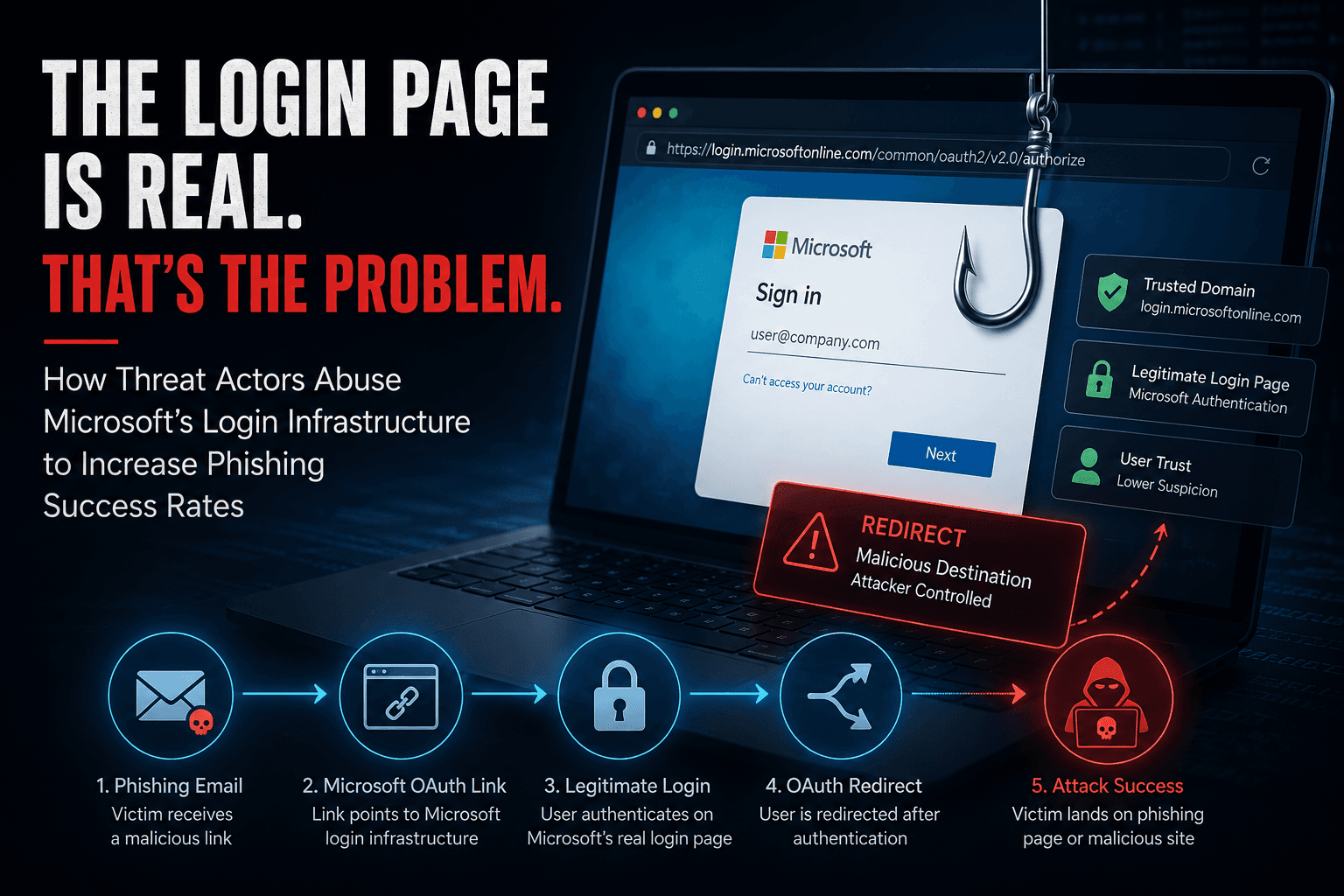
The flow looks like this:
- Victim receives a phishing email.
- User clicks a Microsoft OAuth URL.
- Browser loads Microsoft's legitimate login page.
- User trusts the page because it is hosted by Microsoft.
- Microsoft redirects the user to an attacker-controlled destination.
- Victim enters credentials or additional information on the phishing page.
Because the attack chain begins with a trusted Microsoft URL, many security controls and users never view the interaction as suspicious. Figure 2 shows the redirect trick attack flow.
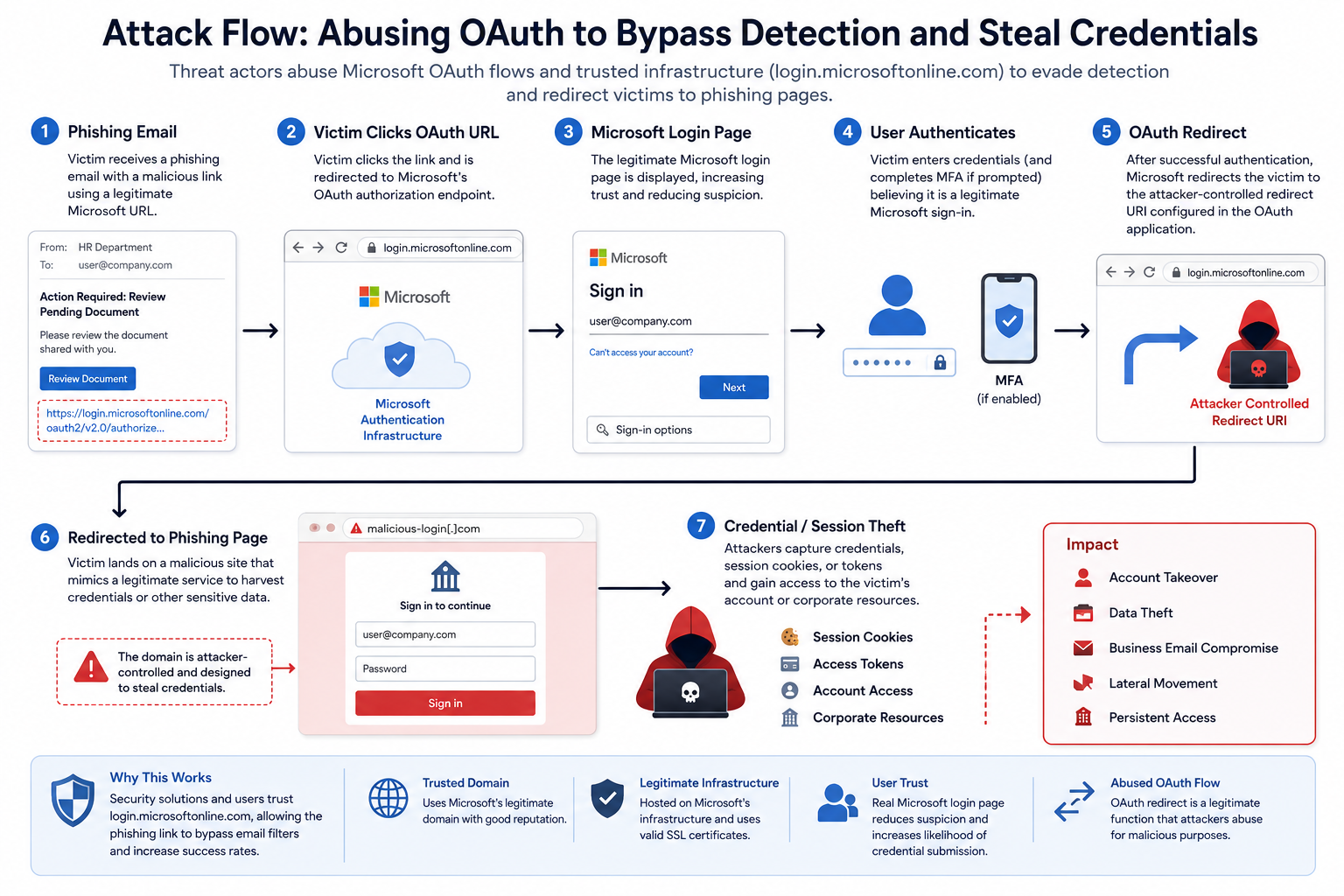
Figure 2: Abusing OAth to Bypass Detection
For example, the attacker sends a phishing email containing a Microsoft OAuth login URL similar to the one below.
https://login.microsoftonline[.]com/common/oauth2/v2.0/authorize?state=%7bRECIPIENT_BASE64_EMAIL%7d&scope=openid&prompt=none&client_id=952a8d0d-0053-4672-953e-d20a6abc4a3a
At first glance, this URL appears completely legitimate. It points to Microsoft's official authentication infrastructure and contains no obvious indicators that would raise suspicion. As a result, the link may bypass traditional reputation-based detection mechanisms and be delivered directly to the user's inbox. However, once the user clicks the link, they are redirected to an attacker-controlled phishing page, as shown below.
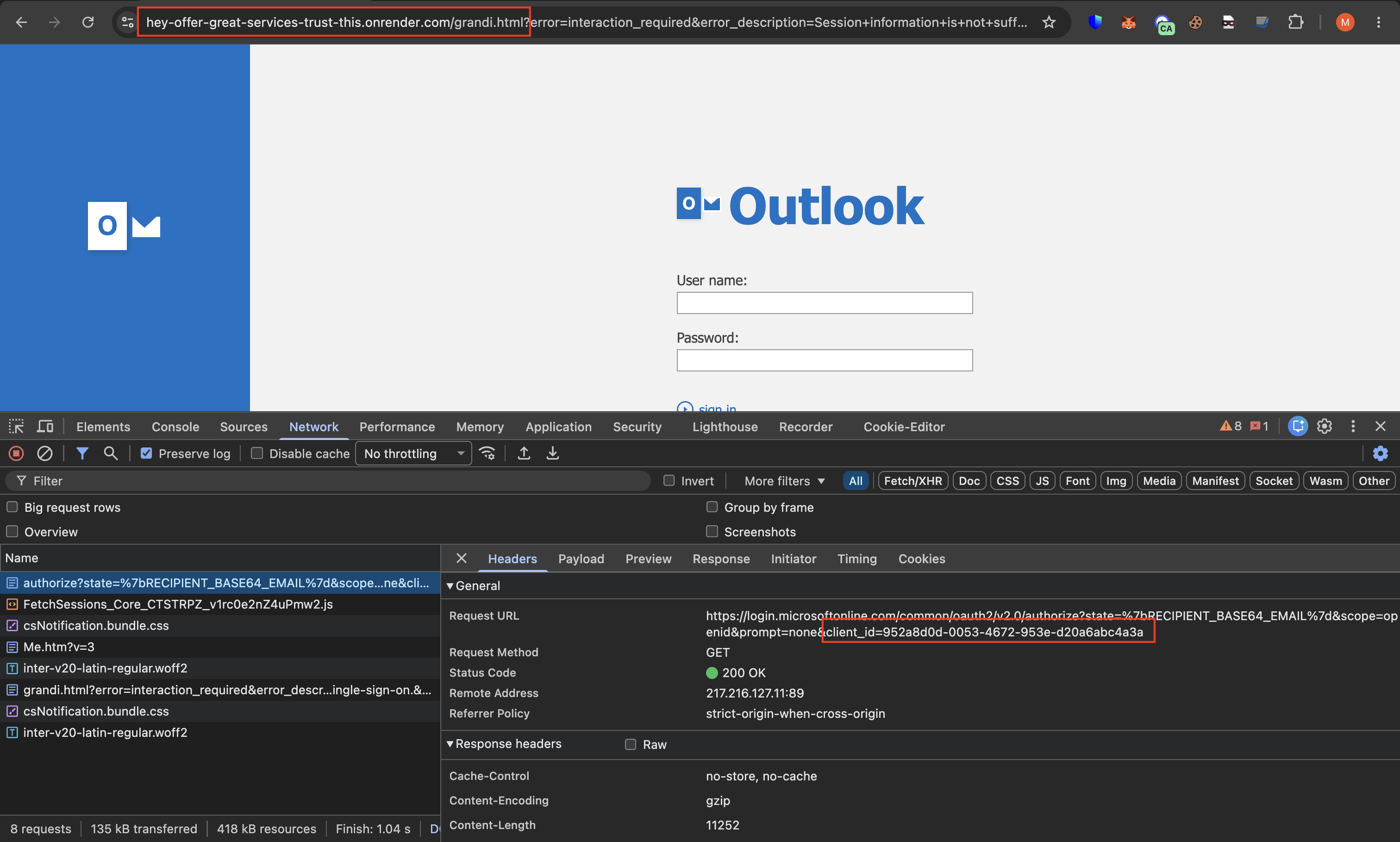
Figure 3: Phish Webpage Using OAuth Bypass
As shown above, the Microsoft OAuth URL ultimately redirects the user to a phishing website. Below is the final credential harvesting page presented to the victim.
https://hey-offer-great-services-trust-this.onrender[.]com/grandi.htm
Why This Matters
Many organizations assume that a Microsoft login page means the activity is safe.
Attackers understand this assumption and actively weaponize it.
The result is a phishing campaign that:
- Looks legitimate
- Uses trusted infrastructure
- Avoids suspicious domains
- Increases user confidence
- Reduces detection opportunities
In some cases, security teams reviewing logs may only see a user accessing Microsoft's authentication services, making investigation significantly more difficult.
EvilToken: Stealing Tokens Through Device Login
As defenders improved their ability to detect credential phishing and adversary-in-the-middle (AiTM) attacks, cybercriminals shifted their focus once again. Rather than stealing passwords or session cookies, many attackers are now targeting something even more valuable: OAuth access and refresh tokens.
One of the most notable examples is EvilToken, a phishing technique that abuses Microsoft's Device Authorization Flow to obtain legitimate authentication tokens directly from victims.
What Is Device Login?
The Device Authorization Flow was designed for devices that have limited input capabilities, such as:
- Smart TVs
- Printers
- IoT devices
- Conference room equipment
Instead of entering credentials directly on the device, the user is presented with a device code and instructed to visit a Microsoft login page to complete authentication.
The intended process is simple:
- The device generates a device code.
- The user navigates to Microsoft's login portal.
- The user enters the code.
- Microsoft authenticates the user.
- Microsoft issues access tokens to the device.
The problem is that attackers can abuse this same workflow.
How EvilToken Works
In an EvilToken attack, the threat actor initiates a legitimate Device Authorization request through Microsoft's infrastructure.
Microsoft returns a valid device code associated with the attacker's session.
The attacker then tricks the victim into entering that device code through phishing emails, fake document-sharing notifications, Microsoft Teams messages, or other social engineering techniques.
The attack flow typically looks like this:
- The attacker generates a Microsoft device code.
- A phishing email is sent to the victim.
- The victim visits Microsoft's legitimate login page.
- The victim enters the provided device code.
- The victim completes authentication and MFA.
- Microsoft issues access and refresh tokens.
- The attacker receives the tokens and gains access to the victim's Microsoft 365 account.
At no point does the victim enter their credentials into a phishing website.
At no point does the attacker need to bypass MFA.
The victim willingly authorizes the attacker's session through Microsoft's legitimate authentication process. Figure 4 shows the overview of the attack.
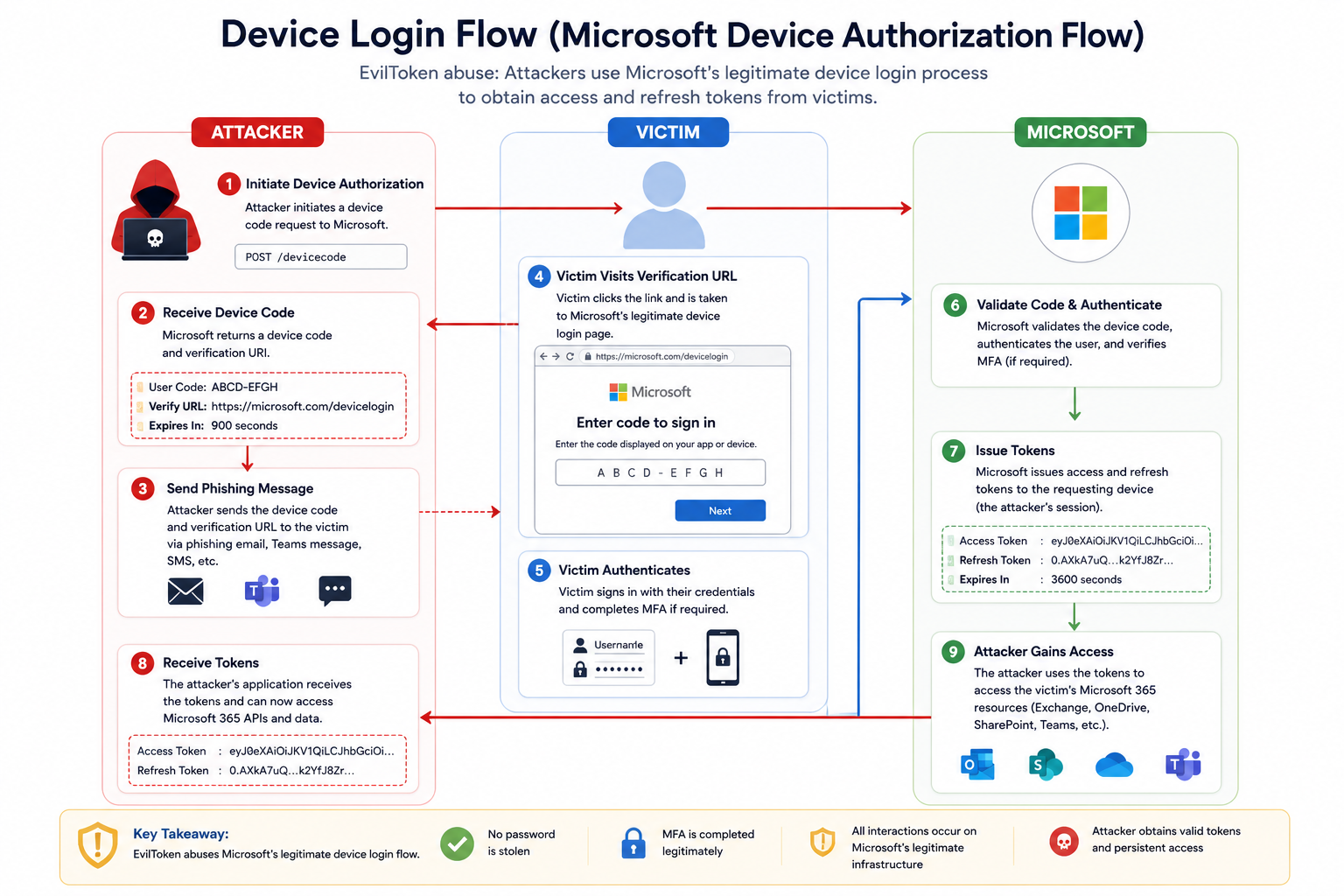
Figure 4: Device Login Attack Flow
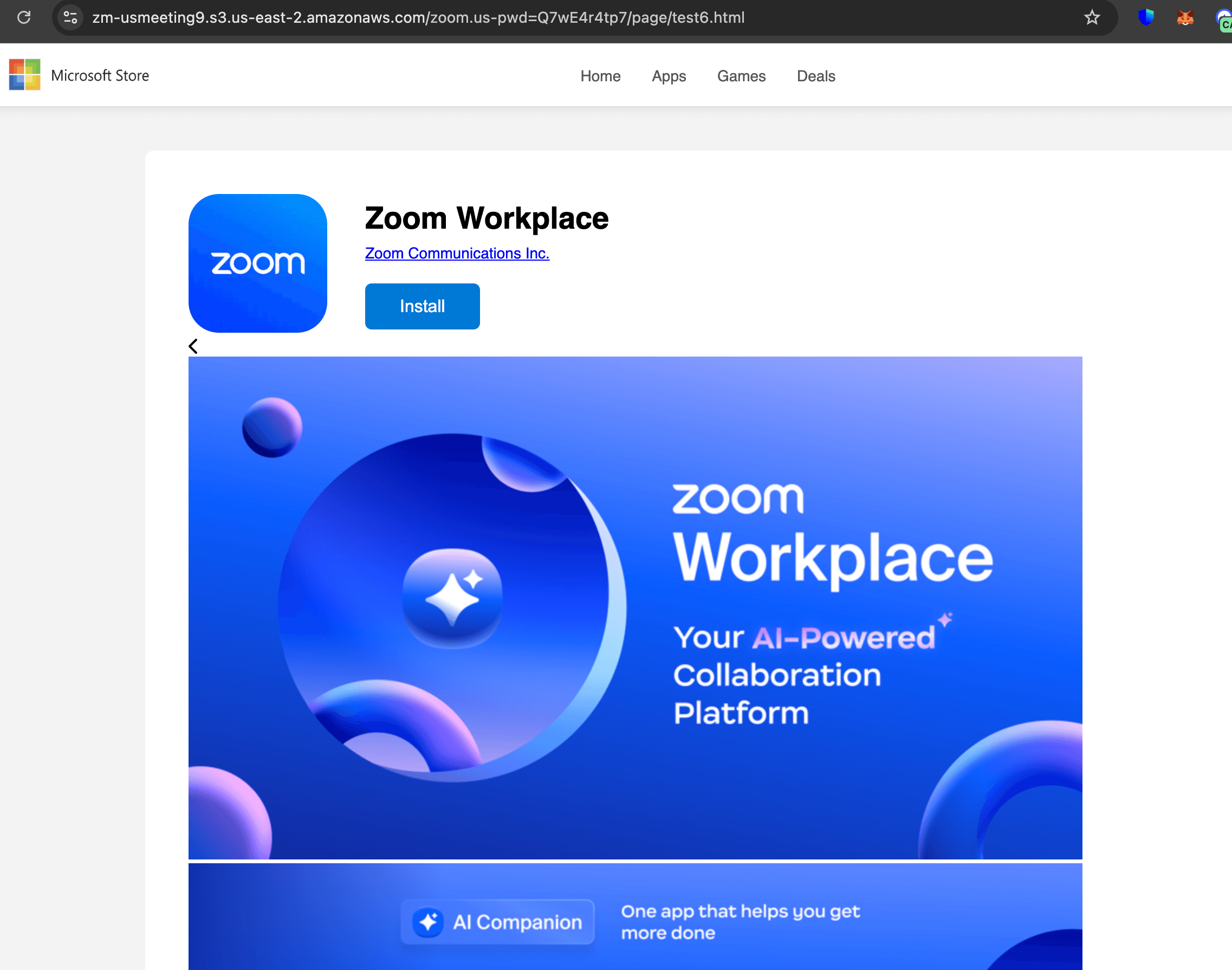
Figure 5 shows the example of device login phish page.
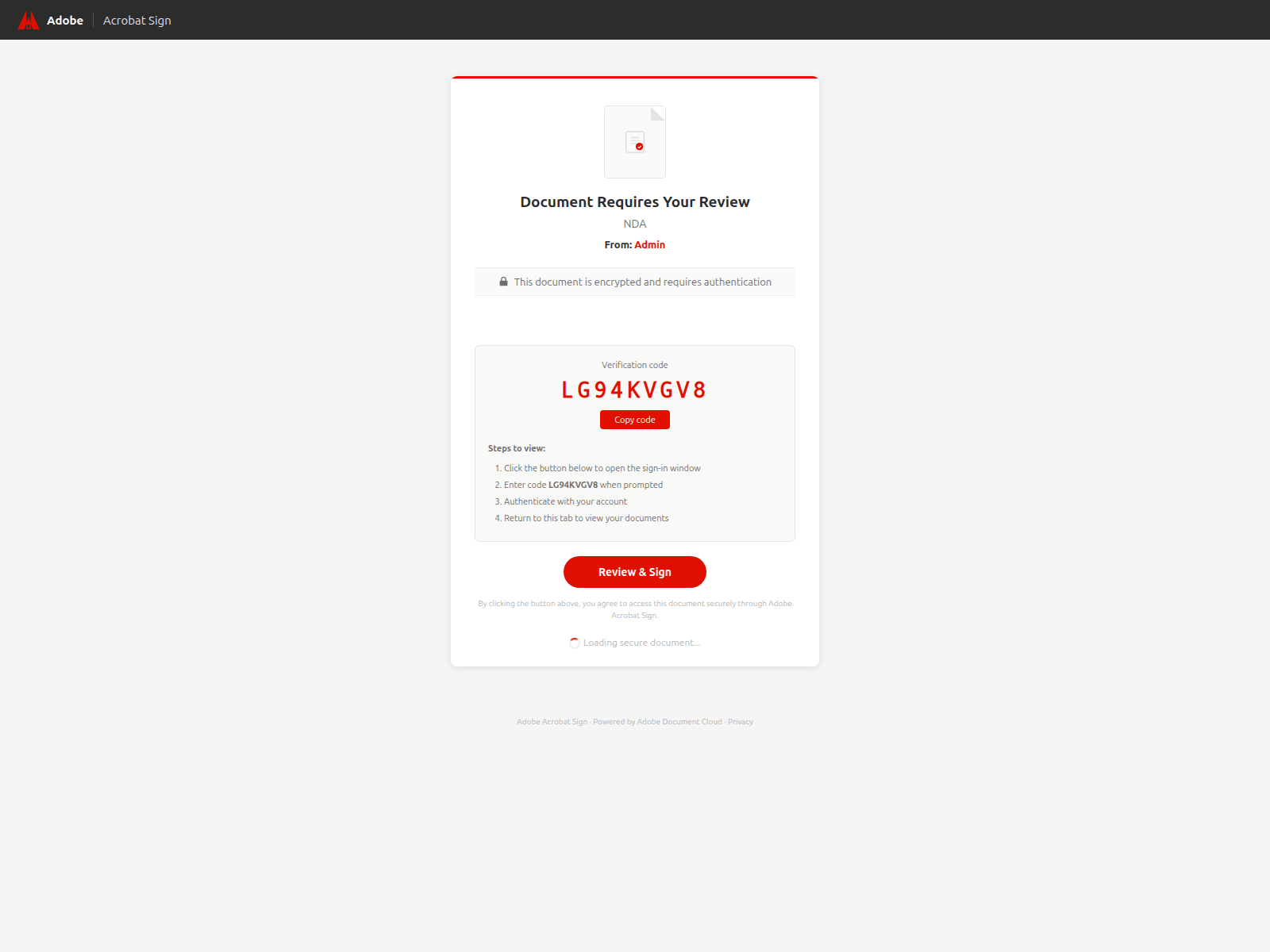
Figure 5: EvilToken Phish Page
Once the device authorization process is completed, the attacker may obtain:
- Access tokens
- Refresh tokens
- Granted OAuth scopes and permissions
- User profile information
Depending on the permissions granted, the attacker may gain access to Microsoft 365 resources such as Outlook, OneDrive, SharePoint, Teams, and Microsoft Graph APIs.
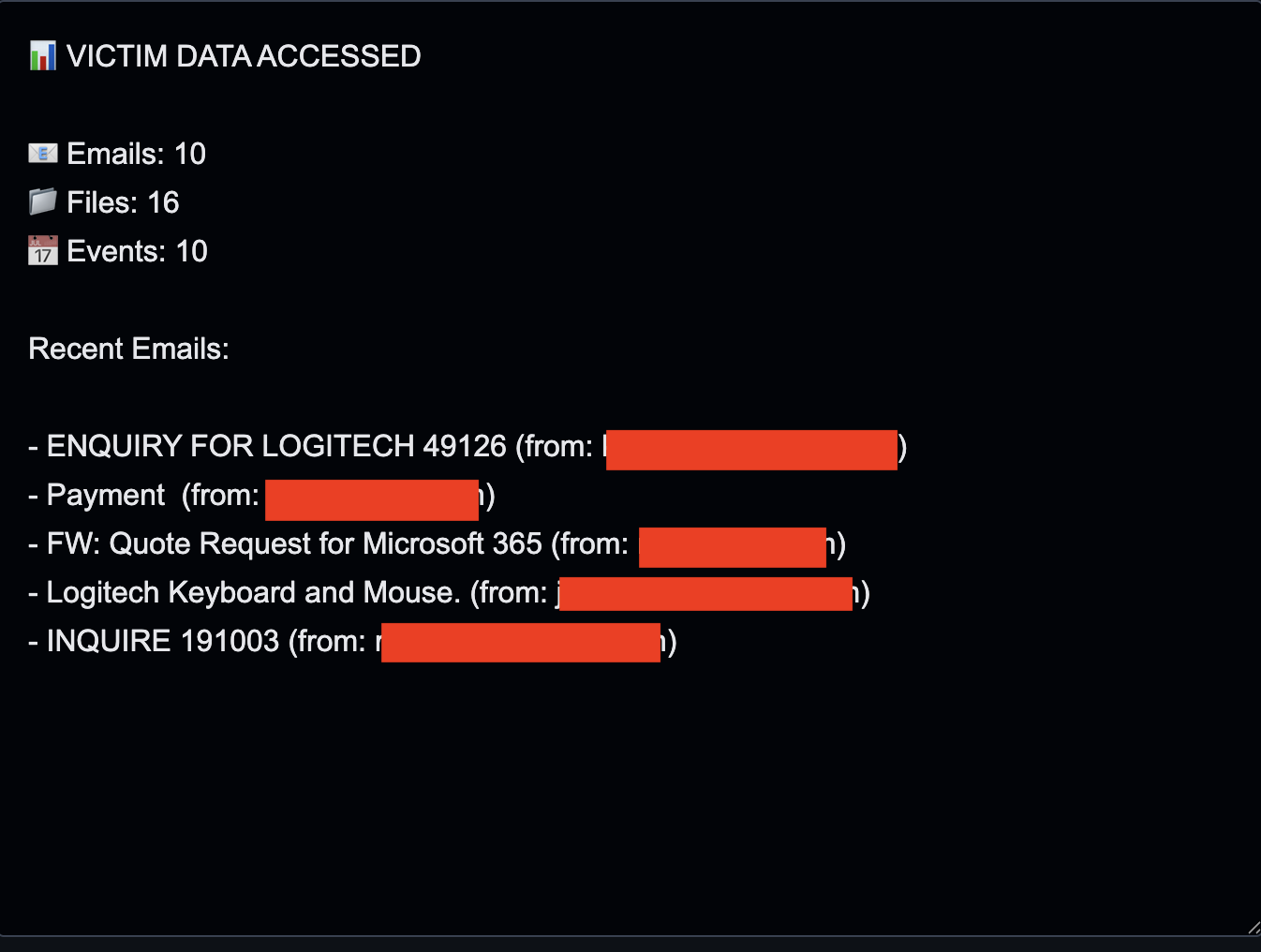
Phishing platforms such as Kali365 automate this process. Once access is established, the phishing kit immediately begins enumerating and collecting data from the victim's account, including:
- Emails
- Files
- Calendar events
- Contacts
This reconnaissance phase helps the attacker understand the victim's role, identify high-value accounts, locate sensitive information, and determine the potential business impact of the compromise. Figure 6 shows an example of the data collected from a phishing victim following a successful account compromise.
The Real Prize: Refresh Tokens
While access tokens eventually expire, refresh tokens can often be used to obtain new access tokens without requiring the victim to authenticate again. This makes refresh tokens particularly valuable to attackers. With a valid refresh token, a threat actor may maintain access to:
- Outlook
- SharePoint
- OneDrive
- Teams
- Microsoft Graph-enabled applications
without ever knowing the victim's password.
EvilToken demonstrates how phishing is evolving beyond credential theft. Instead of impersonating Microsoft, attackers are increasingly abusing Microsoft's own authentication infrastructure to obtain trusted access.
In addition to OAuth access and refresh tokens, we have recently observed threat actors targeting Single Sign-On (SSO) authentication artifacts, including Microsoft Cloud Kerberos tokens. This demonstrates that cybercriminals are constantly evolving their tactics and researching new techniques to gain unauthorized access to user accounts.
What Defenders Should Watch For
Organizations should monitor more than just passwords.
Key areas include:
- OAuth Application Activity
- Device Login
- Login location
Review unfamiliar applications requesting access to organizational resources.
- User Consent Events
Monitor users granting permissions to previously unseen applications.
- Authentication Anomalies
Look for:
- New devices
- New locations
- Impossible travel
- Unusual login patterns
Session Abuse
Monitor for unusual API activity and authenticated sessions originating from suspicious locations or devices.
Continuous User Education
Users should understand that a Microsoft login page alone does not guarantee safety.
The login page may be legitimate while the overall workflow remains malicious.
Summary
Cybercriminals are increasingly abusing trusted platforms instead of building their own infrastructure.
By leveraging Microsoft's authentication ecosystem, attackers gain credibility, improve phishing success rates, and reduce many of the indicators defenders traditionally rely on.
The challenge for defenders is no longer identifying fake login pages.
The challenge is recognizing when legitimate infrastructure is being used for malicious purposes.
Because in modern phishing campaigns, the login page may be real, the domain may be legitimate, and the attack may still succeed.
Indicators of Compromised:
https://efynvtx6y4.accordhealths[.]net/l/W_gR38fvytUhttps://zymewires[.]com/fern-healthhttps://roweemensw.us-southeast-1.linodeobjects[.]com/RFP.pdf%20(3).htmlhttps://document234672146.sfo3.digitaloceanspaces[.]com/Shared_Document.pdf.htmlhttps://j44sa9f8e3.weyehauser[.]com/l/gxsyGBabMT0https://aibeenang.sfo2.cdn.digitaloceanspaces[.]com/RFP.pdf%20(21).htmlhttps://html[.]cafe/x622af415http://docu-signatory.github[.]io/outlook`https://hey-offer-great-services-trust-this.onrender[.]com`952a8d0d-0053-4672-953e-d20a6abc4a3a6c73b150-7f4e-4861-aae2-873f32c90206https://guzeldagenerji.com[.]tr
Want to detect threats 8+ months earlier?
See how DarkArmor's PreBreach intelligence can protect your organization.